

Master Group Therapy Scheduling with Hypnotes
Last Updated on November 14, 2026
Quick Answer: Effective Group Therapy Scheduling requires software that handles multi-client bookings, virtual room allocation, and collective billing in one place. Hypnotes automates these tasks, allowing therapists to focus on clinical care rather than administrative chaos. By using dedicated practice management Group sessions tools, you reduce double-booking errors and Streamline therapist Group billing significantly.
The Hidden Costs of Manual Group Coordination
Therapists often underestimate the administrative burden of leading groups. Unlike individual sessions, Group Therapy involves coordinating five to eighteen clients simultaneously. You must manage availability, assign virtual rooms, and track attendance for each member. When you rely on spreadsheets or separate calendars, errors multiply.
We have seen practices lose significant Revenue due to simple oversights. A client misses a session because the link broke. Another double-books. The billing claim gets rejected because one member lacked insurance eligibility. These are not rare edge cases; they are daily realities without proper Scheduling software Features. The mental load of tracking who has paid, who has attended, and who needs a reminder consumes hours that should go into clinical work.
Traditional calendars fail here. They show individual appointments, not Group dynamics. You cannot see if a client booked an individual session that overlaps with their Group meeting. You cannot easily split a bulk invoice into individual claims. This friction leads to burnout and Revenue leakage. Manual coordination of Group sessions is a primary driver of administrative burnout in private practices.
How Hypnotes Streamlines Group Therapy Scheduling
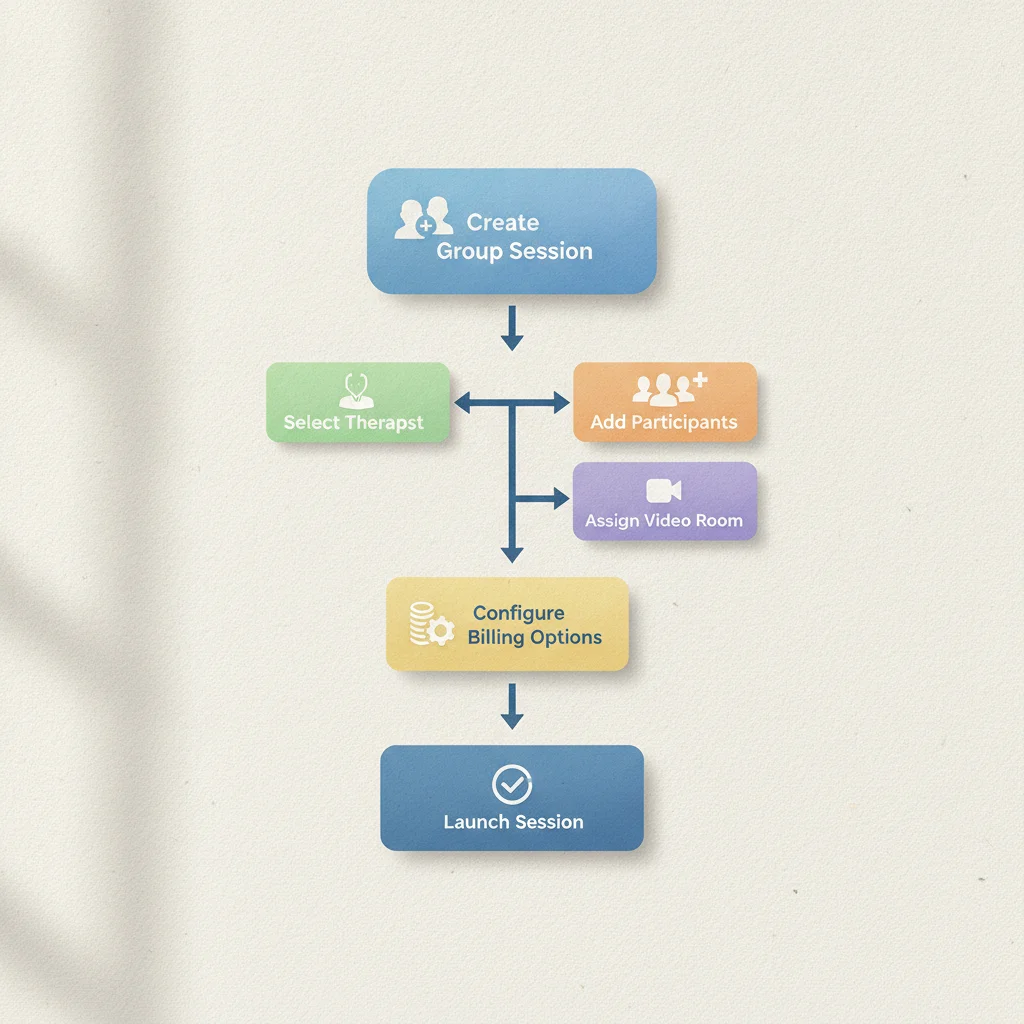
Hypnotes is built specifically for the complexities of mental health Group Therapy. It moves beyond simple calendar slots to handle the specific requirements of Group modalities. Here is exactly how the system works when you set up a new Group.
Step 1: Create the Group Cohort
Start by defining the Group parameters. You specify the Group name, maximum capacity, and the recurring schedule. For example, a weekly 60-minute evening Group. The system creates a unique Group ID that links all enrolled clients to this specific instance. This centralizes all data for that cohort.
Step 2: Enroll Clients with Eligibility Checks
When you add a client, Hypnotes checks their profile. It verifies insurance eligibility if you use insurance billing. It also checks for Scheduling conflicts with their other appointments. This step prevents the most common error: booking a client who is unavailable or ineligible. You assign them to the Group with a single action.
Step 3: Automate Reminders and Room Allocation
Once enrolled, the system triggers automated reminders via email or SMS. These reminders include the secure telehealth link or location details. For virtual groups, Hypnotes allocates a secure, private virtual room for each session. Every participant receives the same secure link, ensuring HIPAA compliance without manual link generation.
Step 4: Execute the Session with AI Assistance
During the session, you do not need to manually type notes for every speaker later. Our AI scribe for Group notes listens to the session (with proper consent and local processing) and captures key clinical points. It differentiates between facilitator prompts and client contributions. This creates a structured draft note that you can review and finalize in minutes, not hours.
Why Practice Management for Group Sessions Requires Specialized Tools
General practice management software often struggles with Group logic. It treats every appointment as an individual interaction. This mismatch creates several operational gaps.
| Feature | Standard Calendar/Practice Software | Hypnotes Group Therapy System |
|---|---|---|
| Booking Logic | Single-client slots | Multi-client cohort management |
| Billing | Individual claims only | Split bulk invoice per participant |
| Telehealth | Generic links | Secure, allocated Group rooms |
| Notes | Manual transcription | AI-assisted Group note drafting |
| Reminders | Individual defaults | Group-specific automated flows |
The distinction matters for compliance and efficiency. According to APA guidelines for Group Therapy, maintaining accurate participant records is Essential for ethical practice. Standard tools make this difficult. They force you to export data, format it, and re-enter it into billing systems. This manual transfer introduces risk. Hypnotes keeps the data flow continuous. The client data, attendance, and billing information remain in one secure, HIPAA-compliant database.
This integration also speeds up reimbursement. When a Group session ends, the system knows exactly which clients participated. It can automatically generate the line items for each participant’s claim. You do not need to manually code each individual visit. You review the batch, approve it, and submit. This reduces the time from session completion to claim submission from days to hours.
How to Handle Therapist Group Billing Efficiently
Group billing is where many practices lose money. The complexity lies in handling different insurance plans, self-pay rates, and no-show fees within a single session. Hypnotes handles this through automated batch billing.
- Capture Attendance: The system records who checked in and out. If a client logs off early, the timestamp is captured. This data supports accurate coding for partial sessions if required.
- Apply Rate Tables: You pre-set rates for each client based on their payer. The system applies the correct CPT code and rate to each line item automatically.
- Generate Batch Claims: A single action creates a batch file containing all individual claims for that Group session. This file is formatted for clearinghouse submission.
- Track Denials: If a claim is denied, the system flags it and links it back to the specific client and session. You can view the reason for denial and resubmit with corrections easily.
This process eliminates the spreadsheet juggling that plagues Group practices. You no longer need to open Excel to match attendees to invoices. The data flows directly from the session log to the billing module. Automated batch billing reduces administrative time per Group session by up to 70%.
For self-pay clients, the system sends automated payment reminders. These reminders include a secure payment link. This reduces the awkwardness of chasing payments and speeds up cash flow. You can also set up multi-session packages. For example, a client pays upfront for a 10-session package. The system deducts one session per week from their balance. This guarantees Revenue upfront and reduces no-shows, as clients have already paid.
Leveraging AI Scribe for Group Notes
Writing notes for a Group session is incredibly time-consuming. With eight participants, you might need to categorize insights, track progress, and note specific interventions for each person. Doing this manually takes 30 to 60 minutes per session. The AI scribe changes this dynamic.
During the session, the AI listens and transcribes. It identifies speaker turns. It highlights key phrases and clinical observations. After the session, it generates a structured note draft. This draft includes sections for General Group Dynamics, Individual Client Updates, and Interventions Used. You review this draft, make necessary edits, and sign it. The entire process takes five to ten minutes.
This is not just about saving time. It is about consistency. AI ensures that no client is overlooked in the documentation. It maintains a neutral tone and captures details that might slip by a tired clinician. You retain full control over the final content. The AI is a tool, not a decision-maker. You review every word before finalizing. This balances efficiency with clinical responsibility.
Increasing Revenue with Client Portal Tools

Revenue leakage often happens at the booking stage. Clients struggle to find available slots or get confused by payment terms. The client portal in Hypnotes solves this. Clients can view their Group schedule, join sessions, and pay invoices directly through the portal. This reduces friction and administrative questions.
The portal also supports secure messaging for non-urgent queries. This keeps your phone lines clear for emergencies and Scheduling conflicts. It also provides a place for clients to submit pre-appointment forms. For Group Therapy, this might include updated contact info or specific goals for the week. Having this information ready before the session starts saves setup time.
You can also offer add-on services through the portal. For example, a stress management worksheet for a specific Group. Clients can access these resources digitally. This positions your practice as resource-rich and client-centered. It also creates opportunities to upsell individual sessions for clients who need more intensive support. The portal makes these transitions smooth and professional.
Monitoring your Hypnotes pricing plans will show you that the investment pays for itself quickly. The time saved on notes, billing, and Scheduling adds up to hundreds of billable hours per year. If you value your time at $100 per hour, the savings are substantial. The software pays for itself multiple times over in the first year.
Common Mistakes to Avoid in Group Session Management
Even with good software, users make avoidable errors. Here are the top mistakes we see and how to fix them.
- Ignoring Capacity Limits: Setting a Group too large reduces quality and session time. Stick to 8-12 members for most therapeutic groups. Enforce this limit in the settings to prevent overbooking.
- Poor Onboarding: Sending clients manual emails for links instead of using automated flows. Always use the built-in reminder system to ensure consistency and HIPAA compliance.
- Manual Note Taking: Attempting to type notes during the live session. This distracts from facilitating the Group. Rely on the AI scribe to capture the conversation.
- Unclear Billing Policies: Not stating no-show fees clearly in the initial consent forms. Use the client portal to require digital signature on these policies before enrollment.
Avoiding these mistakes requires discipline. Set your rules once in the software, and let the system enforce them. Do not try to manage exceptions manually. If a rule is important, automate it.
Getting Started with Hypnotes
Transitioning to a more efficient workflow is easier than you think. Importing your existing client data is straightforward. We provide templates for bulk import. Your existing calendar entries can be mapped to the new system. The migration process typically takes less than two weeks.
Our team provides onboarding support. You get access to training materials and live sessions. We help you set up your Group templates, billing rules, and reminder flows. You do not have to figure it out alone. Group Therapy Features overview details all the capabilities specific to your needs.
Start your 14-day free trial today. You can set up a test Group, invite a few colleagues, and see how the system works. Experiment with the AI scribe and billing Features. See how much time you save. There is no long-term contract required. If it does not meet your needs, you can walk away. But if it does, you will never go back to spreadsheets.
Frequently Asked Questions
Does Hypnotes support insurance billing for Group sessions?
Yes, Hypnotes supports Group billing. It can split a single session into individual claims for each participant. Each claim uses the correct CPT code and rate based on the client’s insurance plan. This automates the most complex part of Group billing.
How does the AI scribe handle multiple speakers?
The AI identifies different voices and assigns them to the correct client profile. It creates a transcript with speaker labels. It then summarizes the key points for each client. You review this summary and edit it as needed. The system requires consent from all participants before processing audio.
Can I schedule overlapping individual and Group sessions?
Yes, the system checks for conflicts. If a client books an individual session that overlaps with their Group, you will be alerted. This prevents double-booking and ensures you are not in two places at once. The calendar view clearly shows all your commitments.
Is the platform HIPAA compliant?
Yes, Hypnotes is fully HIPAA compliant. All data is encrypted in transit and at rest. The platform uses secure telehealth links that meet healthcare standards. You can sign a Business Associate Agreement (BAA) to ensure your compliance posture.
How long does it take to set up a new Group?
Setting up a new Group takes about 10 minutes. You define the schedule, capacity, and billing rate. You then enroll clients. The system handles the rest, including reminders and room allocation. You can clone existing groups to save time on recurring cohorts.