

HIPAA Audit Software: Simple Compliance for Therapists
Last Updated on November 17, 2026
Quick Answer: Dedicated HIPAA audit Software automatically logs chart access, stamps session notes, and compiles proof for regulators. Instead of scrambling to reconstruct messy paper files or shared drive histories during an investigation, your Practice runs an immutable EHR audit trail that tracks views, edits, and telehealth sessions in real time.
An audit notice from the Department of Health and Human Services (HHS) Office for Civil Rights will ruin any clinician’s week. If you run a solo Practice or direct a group clinic, your patient files might be scattered across billing apps, local hard drives, and old email threads. When investigators ask for eighteen months of access logs, panic hits fast. Hunting down that paperwork wastes billable hours and invites stiff civil monetary penalties.
Manual audit prep simply doesn’t meet federal security standards anymore. Reconstructing who opened a chart, when an assessment changed, or who handled an intake form leaves dangerous gaps. Running dedicated HIPAA audit Software handles that tracking automatically in the background so you never have to scramble.
Why Is HIPAA Audit Software Necessary for Modern Practices?
Federal regulators review technical safeguards with the same intensity they bring to locked file cabinets. The official HHS guide to HIPAA audit procedures spells out hundreds of checkpoints for data transmission, user verification, and log reviews. Keeping up with that standard on spreadsheets creates an administrative nightmare.
Solo Therapists often think Audits happen only to major hospital networks. That’s a mistake. Random desk reviews and disgruntled patient privacy complaints trigger federal investigations into small mental health clinics every month.
Failing an audit rarely stems from bad intentions. Most practices get cited because they can’t produce clear records of everyday system activity. If an auditor asks who read a discharge summary three months ago, verbal assurances mean nothing. You must produce tamper-evident Practice Management audit logs that prove chain-of-custody for every single chart view, note edit, and intake submission.
| Audit Area | Manual Documentation Approach | Hypnotes Automated Approach |
|---|---|---|
| Access Tracking | Paper sign-in sheets; unlogged shared computer folders. | Real-time user authentication and automated session logs. |
| Report Export | Days spent collating spreadsheets, dates, and intake forms. | One-click Compliance Reporting filters by date range and user. |
| Session Notes | Late progress notes; missing review dates and signatures. | Integrated AI Scribe records timestamps and structured entries immediately. |
| Telehealth Records | Unlinked video conference calls on consumer Software apps. | Built-in, fully encrypted video rooms with integrated appointment data. |
Step 1: Setting Up Practice Management Audit Logs in Hypnotes
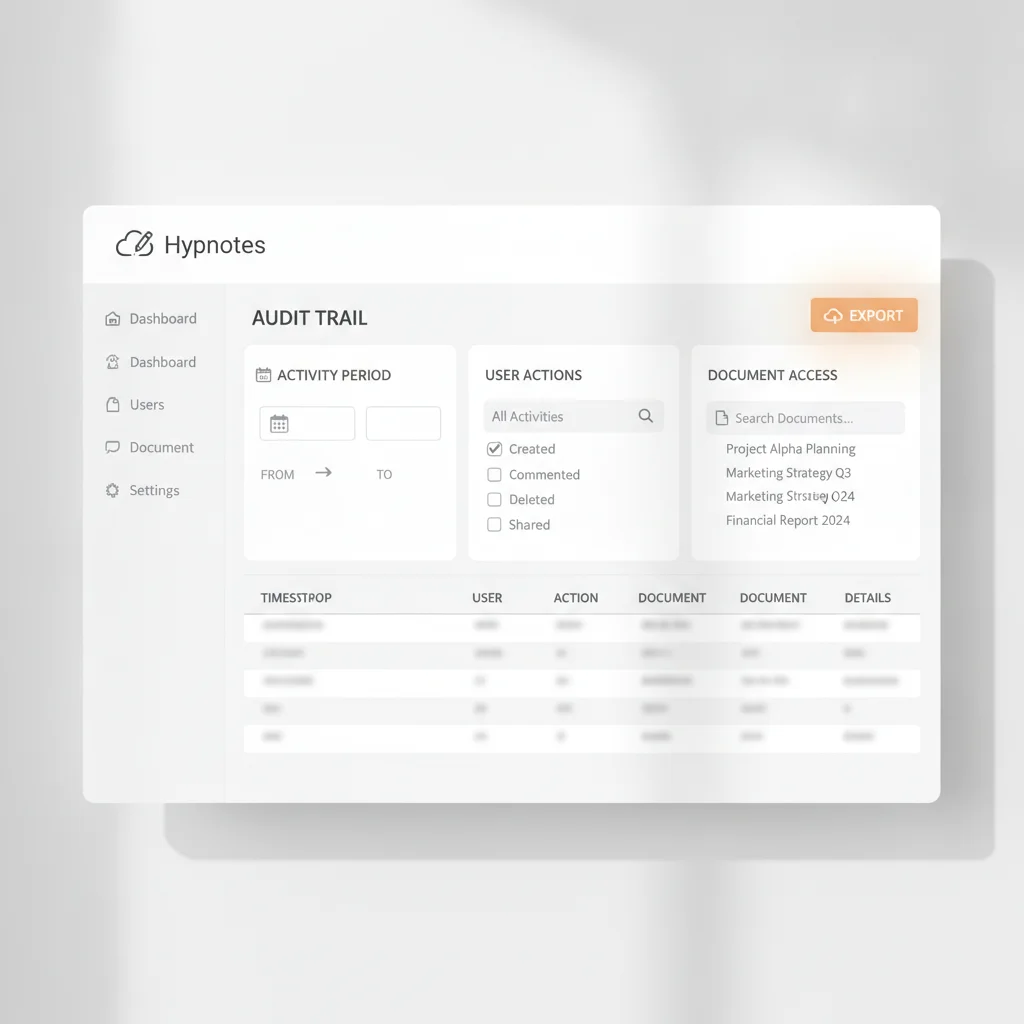
Getting your safeguards configured in Hypnotes takes only a few minutes. The system turns on technical protections the moment you create your account, drawing firm boundaries around sensitive patient data.
- Establish Role-Based Access Controls: Assign specific roles to team members, like clinician, supervisor, biller, or admin. Your front desk can handle client scheduling without seeing confidential psychotherapy notes.
- Activate Two-Factor Authentication: Require multi-factor verification for all staff accounts to shut down unauthorized logins from unrecognized devices.
- Review Automated System Monitoring: Let Hypnotes record file creations, document shares, e-signatures, and calendar edits inside the EHR audit trail without daily manual entry.
Sharing a single administrative login among interns or contract Therapists directly violates the HIPAA Security Rule requirement for unique user identification. Through Hypnotes Practice Management features, every clinician gets individual credentials. The platform binds every chart view, note edit, and billing submission to a specific user ID.
Step 2: Pulling Ready-Made Therapist Compliance Reporting
When an investigator comes knocking, speed builds credibility. Handing over requested files within hours shows your clinic runs a tight ship. If you rely on a built-in HIPAA Reporting tool, you avoid late nights digging through client charts and paper consent forms.
Hypnotes keeps patient files clean and auditable. When an inquiry lands on your desk, open your dashboard to pull full activity histories.
Compliance Benchmark: Federal rules demand that covered entities preserve audit logs and privacy documentation for six years. Hypnotes stores all client intake paperwork, consents, and billing histories within secure cloud backups that remain readily accessible whenever an inspector requests them.
You can filter audit events by patient, clinician, or date range. One-click export tools let you produce chronological activity logs for investigators without handing over unrequested patient files. That keeps you fully responsive to the audit while protecting client confidentiality.
Step 3: Maintaining Clear Records With AI-Assisted Documentation
Disorganized clinical notes raise red flags during an inspection. Incomplete progress notes, late entries, and vague clinical rationales attract penalties from billing auditors and privacy investigators. Bringing AI-assisted documentation into your routine eliminates those chronic backlogs.
Hypnotes gives Therapists built-in clinical writing tools. Instead of scribbling rough notes on legal pads and typing them up days later, you wrap up your documentation right after sessions finish.
- AI Scribe: Converts session details into structured clinical summaries from telehealth appointments, ready for quick clinician review and signature.
- AI Assistant: Refines treatment goals, diagnoses, and interventions so they match standard clinical requirements.
- Secure Architecture: Hypnotes processes notes inside closed, protected systems under a signed Business Associate Agreement (BAA), keeping private disclosures off public machine-learning servers.
Timeliness matters in an audit. Notes written thirty days after a session rarely survive scrutiny during billing or regulatory reviews. Using integrated AI tools helps you complete accurate, defensible charts the same day you see the patient.
What Are the Best Practices for Mental Health Practice Compliance?

Software takes care of the logging, but your clinic still needs solid daily habits. Good technology works best when your team follows consistent privacy routines across every touchpoint.
Put these four habits into Practice across your clinic:
- Run Monthly Internal Audits: Pull three random patient charts each month. Verify that intake consents, telehealth agreements, session notes, and billing codes all match across dates and times.
- Review Active User Access: Cut off Software access for contractors, interns, or departing Therapists on their last working day. Dormant accounts invite security breaches.
- Audit Client Communications: Route all intake documents, assessments, and messages through the encrypted Hypnotes portal instead of standard SMS or personal email.
- Update Your Risk Analysis Annually: Log every laptop, tablet, and phone that touches patient information. Check for unpatched operating systems or unsecured home Wi-Fi networks used by remote clinicians.
Consistent administrative habits turn unexpected audit requests into routine file checks rather than full-blown Practice emergencies. When your notes, intake agreements, and user logs live in one verified system, you stay prepared year-round.
Frequently Asked Questions
What records are required during a HIPAA audit of a therapy Practice?
Auditors require technical access logs, documentation of Business Associate Agreements, client consent forms, transmission security records, and detailed timestamps showing who accessed, modified, or exported protected health information.
How long must mental health practices retain HIPAA audit trail logs?
Under federal HIPAA regulations, practices must retain required Compliance documentation, policies, and system activity logs for at least six years from the date of creation or the date when it last was in effect.
Can AI clinical documentation meet HIPAA Compliance standards?
Yes, provided the AI tool operates within a secure, encrypted platform covered by a signed Business Associate Agreement that avoids storing client data for external machine learning training models.
How does automated Practice Management Software help prevent audit penalties?
Automated platforms record every chart access, export, and billing update in tamper-evident logs, eliminating the human error and missing records that typically trigger audit fines.
Protect Your Practice With Automated Compliance
Hypnotes combines scheduling, automated audit trails, telehealth, forms, and clinical AI tools inside one secure, HIPAA-compliant system built for modern practitioners.