

PHQ-9 & GAD-7: Assessment Tool Integration for Clinicians
Last Updated on November 18, 2026
Connecting instruments like the PHQ-9 and GAD-7 directly to your EHR eliminates the scramble of manual entry. For clinicians using Hypnotes practice management software, direct Assessment tool integration means screening data lands in the patient chart the moment it is submitted. You don’t have to download PDFs, transcribe scores, or double-check whether a form arrived before a session starts. This guide walks through the API authentication, data mapping, and webhook setup required for a clean, HIPAA-compliant workflow.
Why Manual Data Entry Fails in Therapy Practices
Therapists aren’t data entry clerks. When you juggle back-to-back sessions, retyping scores from Third-Party portals into clinical progress notes easily slips down the priority list. Worse, transcription errors cause up to 4% of screening data to get recorded incorrectly—a margin large enough to compromise diagnostic tracking over time.
Automating the therapy software API connection ensures every score matches the patient’s original submission, protecting both clinical accuracy and your liability position.
Standardized Tools depend on exact scoring thresholds. The Patient Health Questionnaire tracks depression severity, with baseline scoring rubrics detailed on the Patient Health Questionnaire (PHQ‑9) Wikipedia page. On the anxiety side, the GAD‑7 overview on NCBI documents the clinical validation behind generalized anxiety screening. When patients complete these screeners in external portals, an automated bridge brings that raw data straight into your primary workspace.
Managing the Technology Stack
Most solo practitioners and group practices run on three to five disconnected apps: one calendar, an isolated telehealth room, a stand-alone form service, an AI scribe, and a billing platform. That fragmentation bleeds administrative time every week.
Consolidating your workflow inside Hypnotes brings Scheduling, Appointments, Documents, Telehealth, AI Scribe, AI Assistant, Secure Forms and Surveys, and Insurance Billing under a single HIPAA-compliant umbrella.
Review the full list of supported connections on the Hypnotes integrations overview page before starting your API setup.
How to Configure Your Assessment Tool Integration
Follow these numbered steps to connect an external psychometric platform to your Hypnotes workspace.
- Generate API Credentials: Sign in to your external Assessment portal. Go to “Developer Settings” and create a new Integration Key. Copy the API Key and Secret directly into your password manager. Never send these keys through unencrypted email.
- Open Hypnotes API Settings: In Hypnotes, click Admin Settings, select Integrations, and open API Keys. Click “Add New Connection” and select “Psychometric Assessment” as your category.
- Submit Authentication Details: Paste your Key and Secret into the fields. Test the link. A green “Connected” badge confirms the handshake. If it fails, check both ends for accidental whitespace.
- Define Data Mapping: Align data fields between systems so records land in the right clinical charts.
- Source Total Score maps to Target Clinical Note Score
- Source Item Responses maps to Target Detail Array
- Source Timestamp maps to Target Date of Service
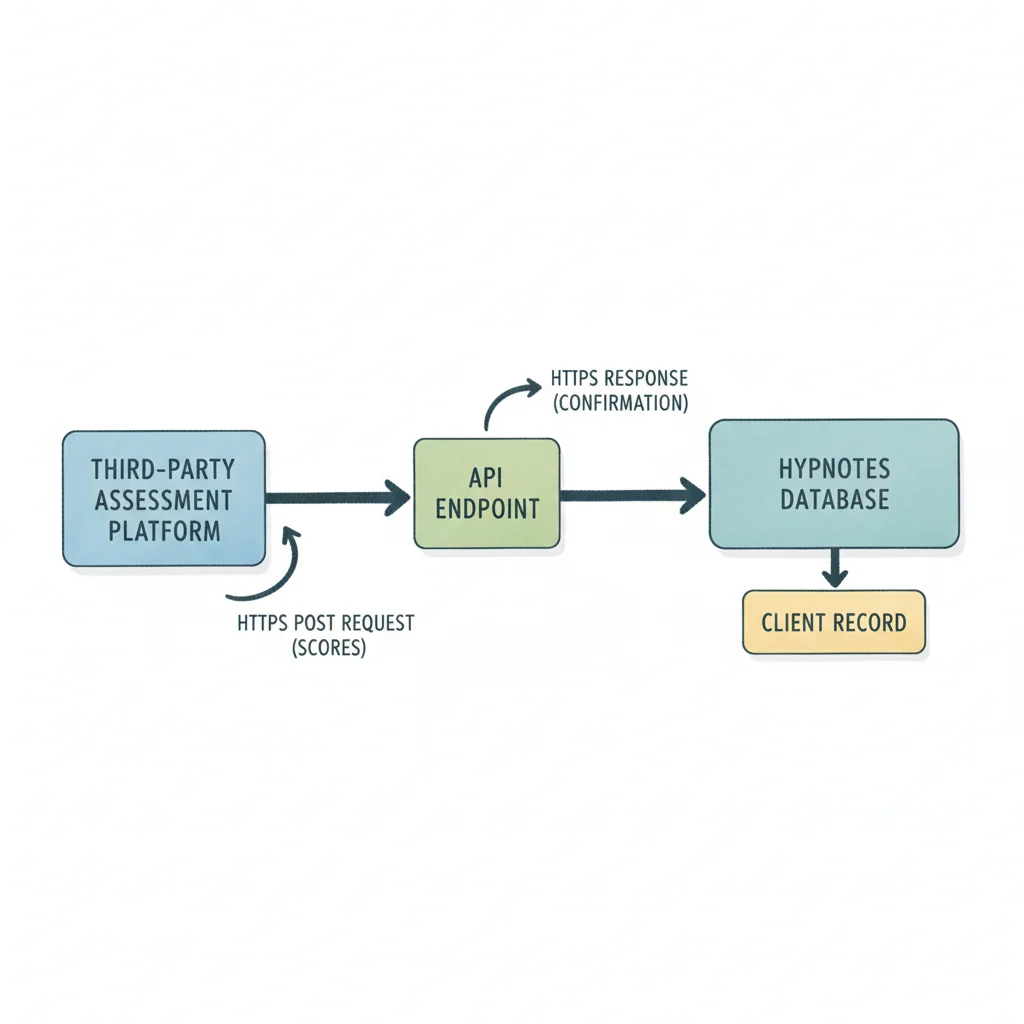
- Configure Webhooks: Turn on “Real-time Score Push.” Paste your Hypnotes endpoint URL into the webhook field and set the payload format to JSON.
- Set Scoring Thresholds: Set automated clinician alerts. We suggest setting the trigger at 15 for the PHQ-9 (Moderately Severe) and 15 for the GAD-7 (Severe) so high-risk scores flag your attention immediately.
Carefully mapping field values during initial setup prevents orphaned Assessment records and unassigned patient scores.
Ensuring HIPAA-Compliant Assessment Tool Integration
Security is the foundation of any clinical data pipeline. Transferring protected health information between independent software platforms requires three distinct safeguards.
Verify that all Assessment data stays encrypted in transit and at rest, and execute a signed Business Associate Agreement before transmitting any patient records.
Encryption Standards
Every API exchange between your screener tool and Hypnotes must use TLS 1.2 or higher. Reject vendors that still rely on TLS 1.0 or 1.1; those older protocols are insecure and fail current data-handling standards. Check your Assessment vendor’s Technical documentation to confirm TLS 1.2+ support.
Business Associate Agreements
Protected health information cannot move between platforms without an active legal agreement. Your Third-Party Assessment provider must sign a BAA directly with your practice. Hypnotes provides standard BAA documentation out of the box so you can maintain strict compliance across your clinical pipeline.
Access Control
Apply the principle of least privilege to API credentials. Your Assessment integration only requires permission to read incoming scores and write them to the client chart. Strip out delete or administrative privileges entirely. If an API key ever leaks, restricted permissions contain the damage.
Common Mistakes in EHR Assessment Import
We see the same configuration issues surface during initial deployments. Avoid these three common pitfalls to save yourself hours of troubleshooting.
| Mistake | Consequence | Fix |
|---|---|---|
| Hardcoding Patient IDs | Data mismatches when client profiles update | Map records dynamically using system-generated patient UUIDs. |
| Ignoring Time Zones | Scores logged on the wrong date or time slot | Transmit timestamps in UTC within the payload and let the EHR display local time. |
| Batching Instead of Real-Time | Critical scores sit unseen for hours | Use webhooks for immediate push events; keep batch jobs for historical imports only. |
Mismatched time zones create confusing clinical timelines where intake assessments appear logged after a completed session instead of before it. Always run a test submission across a known time-zone boundary before turning on automation for active clients.
Scheduling and Workflow Alignment

Data imports should actively inform your day, not just sit in an archive. In Hypnotes, your intake forms generate screening links automatically during booking. When a patient finishes their questionnaire, the parsed score links back to the schedule.
Connecting screening automation directly to your practice calendar guarantees that elevated symptom scores immediately flag a dedicated review window.
Here is what the end-to-end loop looks like in practice:
- A client books a session through your online scheduling link.
- The portal sends an intake confirmation with secure PHQ-9 and GAD-7 forms.
- The client completes the screening items on their device.
- The API transfers the raw items and total scores straight into Hypnotes.
- A total score above 15 flags the record for clinical review.
- The system suggests a 20-minute follow-up window on your calendar.
Testing the Integration
Never deploy an unverified connection to active clients. Set up a dummy patient profile inside Hypnotes and submit a test PHQ-9 through your Assessment interface. Watch the data move.
Check three specific milestones:
- The score shows up inside the test chart without manual intervention.
- The timestamp matches the exact time of submission.
- Scores meeting your threshold criteria trigger the expected clinician alert.
Complete at least three successful test runs before routing live patient submissions through the pipeline. If any field drops, refine your data mapping and re-test.
Cost-Benefit of Automation
Ten minutes of manual data entry per patient quickly balloons into ten hours of administrative drag each month. That is time you cannot bill or spend with family.
Spending two to three hours configuring your initial API connection cuts data transcription errors from 4% to zero while returning billable clinical hours to your schedule.
For group practices with five or more Therapists, the administrative return scales rapidly across every clinician on the team. You can compare plan tiers and available add-ons on the Hypnotes pricing plans page to see what fits your practice size.
Frequently Asked Questions
Do I need a developer to set up this API?
No. Hypnotes uses a straightforward configuration panel. If you can copy an API key and assign a few drop-down mapping fields, you can link standard PHQ-9 and GAD-7 Tools without writing code.
Is the data stored on the external server after import?
Most Assessment vendors retain a historical record in their own databases. However, your EHR copy serves as the legal chart of record for clinical documentation and billing. We suggest marking external records as read-only once imported to prevent conflicting edits.
What happens if the API connection drops?
Hypnotes monitors connection health continuously. If an Assessment fails to post via webhook, the system labels the patient record as “Pending Assessment” and flags it on your dashboard so you never miss an unfiled submission.
Start Your Free 14-Day Trial
Manual score entry wastes time you could spend with clients. Hypnotes consolidates your documentation, telehealth, scheduling, and billing into one secure workspace.
You can complete your entire Assessment setup in a single afternoon.
Start your free 14-day trial of Hypnotes today to automate your intake screeners and modernize your clinical charting.